| Q: How can I delete PowerPivot report published into SharePoint PowerPivot gallery? |
| Written by Vidas Matelis |
| Thursday, 26 November 2009 02:24 |
|
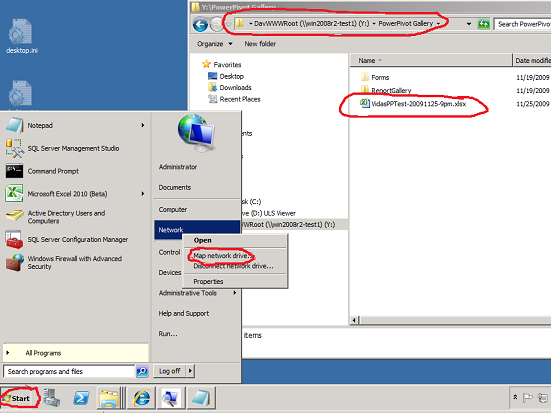
Q: How can I delete PowerPivot report published into SharePoint PowerPivot gallery? A: I could not find an option to delete PowerPivot report from the SharePoint PowerPivot gallery on the website. But you can always add new network drive to your PC with address http://<yourSharePointWebsite and this way access all folders / files in the windows explorer interface. To map network drive click on the "Start button, then find "Network" link and right mouse click on it and choose "Map Network drive..." |
Comments (1)
Author articles
- How to solve issue when PowerPivot for Excel crashes on all workbooks
- Using PowerPivot to analyze web access log in "Combined Log" format (CLF)
- Q: I have integer amount that represents duration in seconds. How can show this amount in format "h:mm:ss"?
- Interview with Marco Russo and Alberto Ferrari about their new book about PowerPivot
- DAX cheat sheet
Most Popular
- Step by step guide on installing PowerPivot for SharePoint on a single machine
- List of suggested datasets to test PowerPivot
- List of PowerPivot DAX functions with description
- How to install PowerPivot for Excel and list of know issues
- Microsoft Virtual Lab: PowerPivot for Excel 2010 Introduction
- List of PowerPivot DAX functions (short)
- Learning PowerPivot and DAX
- PowerPivot's impact on BI pros?


Under "Library Tools", there is a "Delete Document" option in the "Manage" section.