Reposted from Chris Webb's blog with the author's permission.
Continuing my exploration of DAX, here’s a quick post on calculating running totals. I’ll be honest and say that I didn’t work out these expressions myself but got it from a newsgroup exchange between Colin Banfield and Karen Aleksanyan. In this case I want to calculate a running total from the beginning of time up to the current date (as opposed to from the beginning of the current year, as with a year-to-date). There are two possible approaches:
='FactInternetSales'[Sum of SalesAmount](VALUES('DimDate'[FullDateAlternateKey])>='DimDate'[FullDateAlternateKey], ALL('DimDate'[FullDateAlternateKey]))
='FactInternetSales'[Sum of SalesAmount](DATESBETWEEN('DimDate'[FullDateAlternateKey], BLANK(), LASTDATE('DimDate'[FullDateAlternateKey])), ALL('DimDate'[FullDateAlternateKey]))
The first simply asks for a filter of all values from FullDateAlternateKey where the date is greater than or equal to the current row date. Don’t ask me why it needs a ‘greater than’ as opposed to ‘less than’, but that’s what it needs to work – possibly this is a bug. The second expression uses the DatesBetween, Blank and LastDate functions (interesting that the Blank function seems to work in the same way a null does with the colon operator in MDX in this case); it has one advantage over the first expression in that it doesn’t display errors when other columns from the DimDate table are used in the pivot table. Here’s what the output looks like with just dates on rows:
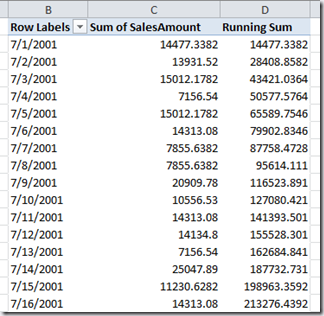
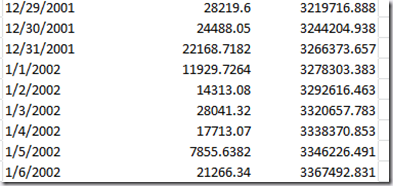
As with the original ytd calculation in my previous post on DAX, neither expression displays the expected values when looking at Years or Quarters, for example – you again just see the same value as Sum of SalesAmount. The really weird thing is that at the date level both calculations return different values when you have Years and Dates on rows to when you just have dates. The screenshot below shows the crossover between 2001 and 2002 with just dates on rows:
Now here’s what you see with Years present:
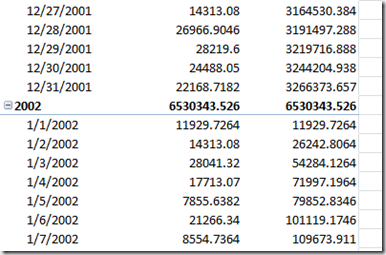
Notice how in the first screenshot the running total carried on across the year boundary, as you’d expect, but in the second case the running total is only calculated from the beginning of the current year. I’m not sure whether this is a bug (although I suspect it is) or expected behaviour; the same thing happens when you slice by Year too, which makes more sense:

As ever, I’ll find out what’s going on and post an update here…
UPDATE: Marius Dumitru has come to the rescue again. Here’s the working version that does everything I want:
='FactInternetSales'[Sum of SalesAmount](DATESBETWEEN('DimDate'[FullDateAlternateKey], BLANK(),LASTDATE( 'DimDate'[FullDateAlternateKey])), All('DimDate'))
Here it is working:

 |
Chris has been working with Microsoft BI tools since he started using beta 3 of OLAP Services back in the late 90s. Since then he has worked with Analysis Services in a number of roles (including three years spent with Microsoft Consulting Services) and he is now an independent consultant specialising in complex MDX, Analysis Services cube design and Analysis Services query performance problems. His company website can be found at http://www.crossjoin.co.uk and his blog can be found at http://cwebbbi.spaces.live.com/ . |