Q: How do I hide "Grand Total" calculation for PowerPivot columns and/or rows?
User Rating: 5 / 5

Q: How do I hide "Grand Total" calculation for PowerPivot columns and/or rows?
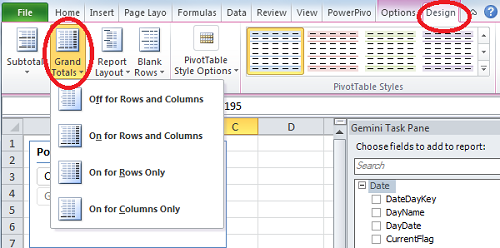
A: Select PowerPivot, then from the ribon choose menu item "Design" and then click on "Grand Totals". You will have 4 options:
- Off for Rows and Columns
- On for Rows and Columns
- On for Rows Only
- On for Columns Only