Q: How can I change maximum PowerPIvot file size that can be uploaded to SharePoint 2010?
User Rating: 1 / 5


Q: How can I change maximum PowerPivot file size that can be uploaded to SharePoint 2010?
There are 2 places you should do the change:
Web Application limit changes (This is SharePoint limit):
- Start SharePoint Central Admin screen
- From "Application Management" group select "Manage web applications":
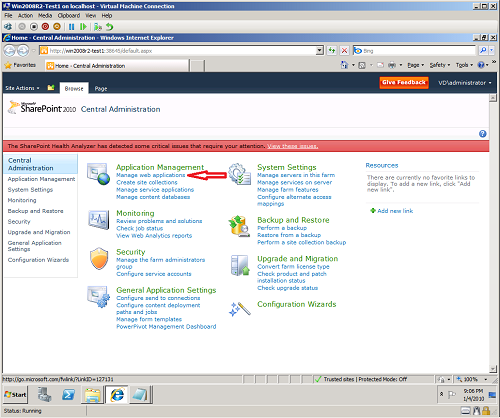
- Select "SharePoint - 80"
- From the above toolbar select "General Settings" and from the drop down menu choose "General Settings"
- New "Web Application General Settings" window will popup and one of the options that you can change will be "Maximum Upload Size". Default value for this option is 50MB.
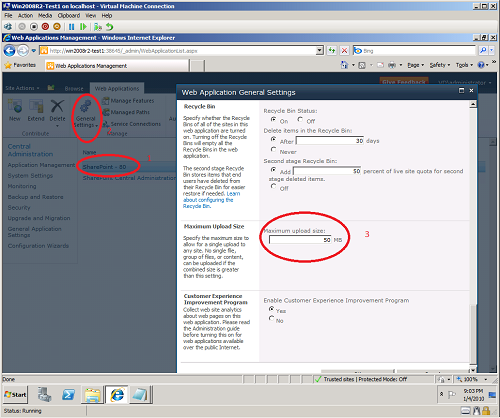
- Change "Maximum Upload Size" to your requirements and then click "OK" to save changes.
If you are using Excel Services, you also need to change limits for "Excel Services":
- Start SharePoint Central Admin screen
- From the "Application Management" group choose "Manage Service Application"
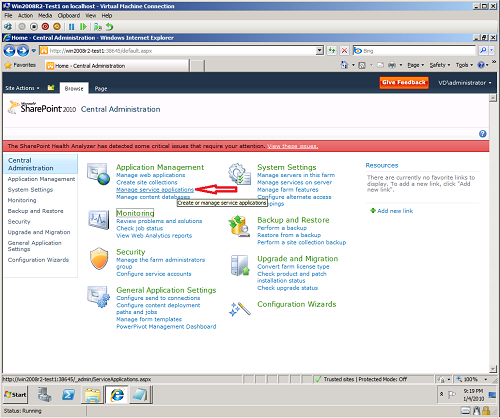
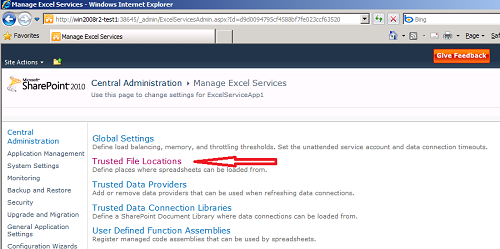
- From the list select "Excel Services Web Service Application". Default name will be "ExcelServicesApp1". If you click on "ExcelServicesApp1", you will be directed to "Manage" windows. If you will click on this row in other place, then this row will be selected and you will have to click "Manage" from the above ribon toolbar.
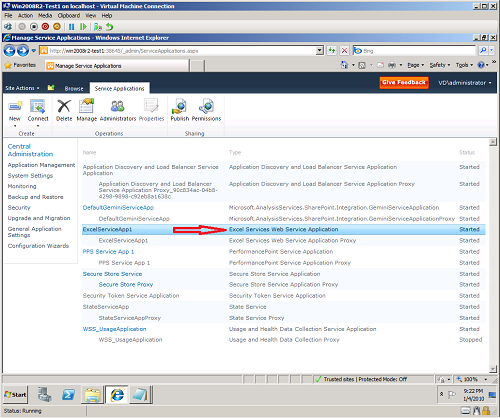
- Select "Trusted File Locations"
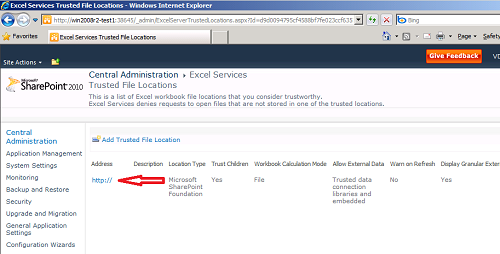
- From the list of trusted file locations select location for which you would like to make adjustment. By default there will be location "http://" that represents "All locations".
- In the "Workbook properties" list you will be able to change property "Maximum Workbook Size". Default value in 50MB.
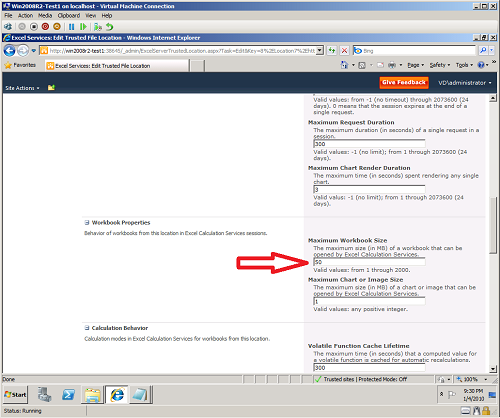
- Click "OK" to save you changes
- Done
Q: What will happens if you will try to upload to SharePoint file that is larger than maximum set limit?
If the file you are trying to upload is to big, you will receive error message, but message text will depend on how you do upload.
When you saving Excel workbook from Excel to Sharepoint you might receive following error message:
Upload Failed Your changes were saved but could not be uploaded because of an error. You may be able to upload this file using the server Web page.
When you try to upload using server web page, you will get following error:
Error
The specified file is larger than the maximum supported file size.
Troubleshoot issues with Microsoft SharePoint Foundation.
Correlation ID: 839a8abf-3f04-4b53-be49-292470c4f581
At the same time your SharePoint log will record following eror:
SPRequest error occurred. More information: 0x80070002 839a8abf-3f04-4b53-be49-292470c4f581
Microsoft.SharePoint.SPException: The specified file is larger than the maximum supported file size. at Microsoft.SharePoint.SPFile.CloneStreamToSPFileStream(SPWeb web, Stream stream, Int64 bytesToCopy) at Microsoft.SharePoint.SPFile.CloneUnknownStreamToSPFileStream(SPWeb web, Stream inputStream) at Microsoft.SharePoint.SPFileCollection.AddStreamOrBytesInternal(String urlOfFile, Stream file, PutFileOpt fileOpt, String createdBy, String modifiedBy, Int32 createdByID, Int32 modifiedByID, DateTime timeCreated, DateTime timeLastModified, Object varProperties, String checkInComment, Stream formatMetadata, String lockIdMatch, String etagToMatch, SPLockType lockType, String lockId, TimeSpan lockTimeout, Boolean validateRequiredFields, SPVirusCheckStatus& virusCheckStatus, String& virusCheckMessage, String& etagNew, Boolean& ignoredRequiredProps) at Microsoft.SharePoint.SPFileCollection.Add(String urlOfFile, Stream file, SPFileCollectionAddParameters parameters) at Microsoft.SharePoint.ApplicationPages.UploadPage.UploadFile(String& leafName, SPVirusCheckStatus& checkStatus, String& virusMessage) at Microsoft.SharePoint.ApplicationPages.UploadPage.UploadFile() at Microsoft.SharePoint.ApplicationPages.UploadPage.OnSubmit(Object o, EventArgs e) at System.Web.UI.HtmlControls.HtmlInputButton.OnServerClick(EventArgs e) at System.Web.UI.Page.RaisePostBackEvent(IPostBackEventHandler sourceControl, String eventArgument) at System.Web.UI.Page.ProcessRequestMain(Boolean includeStagesBeforeAsyncPoint, Boolean includeStagesAfterAsyncPoint) 839a8abf-3f04-4b53-be49-292470c4f581
Tags: setup, sharepoint, faq