| Q: Where in SharePoint can I define "Business Hours" for PowerPivot data refresh? |
| Written by Vidas Matelis |
| Tuesday, 01 December 2009 03:39 |
|
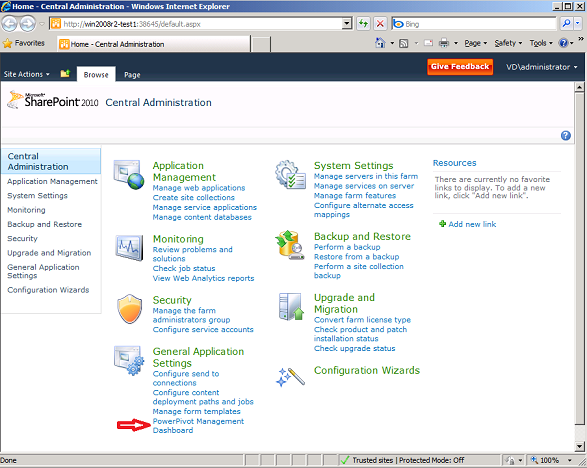
Q: PowerPivot for SharePoint allows to schedule data refresh "After Business Hours". Where can I define when business hours starts and ends for our company? A: Start SharePoint Central Administration website. Select link "PowerPivot Management Dashboard"
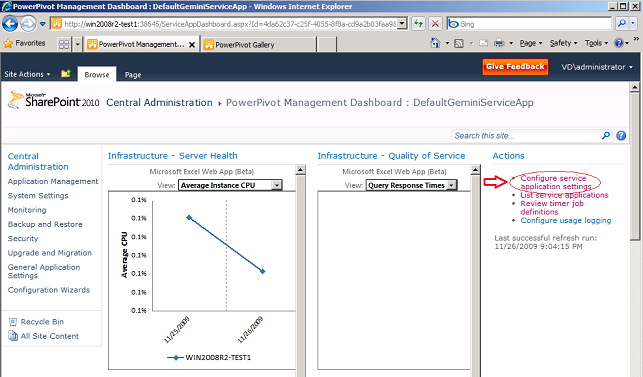
In the top right corner select link "Configure service application settings"
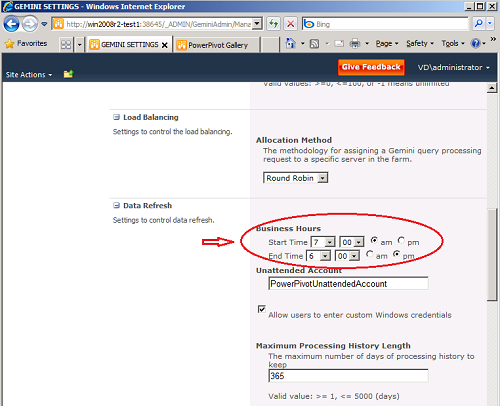
Find "Data Refresh" area and set your required Business Hours.
Done.
|
Author articles
- How to solve issue when PowerPivot for Excel crashes on all workbooks
- Using PowerPivot to analyze web access log in "Combined Log" format (CLF)
- Q: I have integer amount that represents duration in seconds. How can show this amount in format "h:mm:ss"?
- Interview with Marco Russo and Alberto Ferrari about their new book about PowerPivot
- DAX cheat sheet
Most Popular
- Step by step guide on installing PowerPivot for SharePoint on a single machine
- List of suggested datasets to test PowerPivot
- List of PowerPivot DAX functions with description
- How to install PowerPivot for Excel and list of know issues
- Microsoft Virtual Lab: PowerPivot for Excel 2010 Introduction
- List of PowerPivot DAX functions (short)
- Learning PowerPivot and DAX
- PowerPivot's impact on BI pros?


