DAX Queries, Part 3

Reposted from Chris Webb's blog with the author's permission.
Following on from my previous post, let’s now look at how you can add derived columns to a table expression. Let’s start with a simple query that returns every column in DimDate:
evaluate(
DimDate
)
If I want to add some columns to this query without doing any grouping we can use the AddColumns function like so:
evaluate(
AddColumns(
DimDate
, "Calendar Year Name"
, "Calendar Year " & DimDate[CalendarYear]
)
)
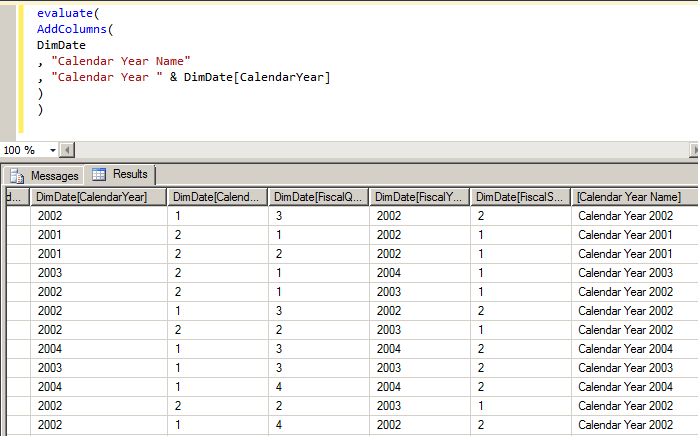
Here I’m adding a new column (shown on the far right in the resultset in the above screenshot) called Calendar Year Name that does a simple concatenation of the string “Calendar Year” with the actual Calendar Year value from the table. You can add multiple columns in this way with more than one column name/expression pair.
The important thing to notice here is that you can’t use this new column to group by in a Summarize() function, so the following query:
evaluate(
Summarize(
AddColumns(
DimDate
, "Calendar Year Name"
, "Calendar Year " & DimDate[CalendarYear]
)
, [Calendar Year Name]
–, DimDate[CalendarYear]
, "Sum of Sales"
, Sum(FactInternetSales[SalesAmount])
)
)
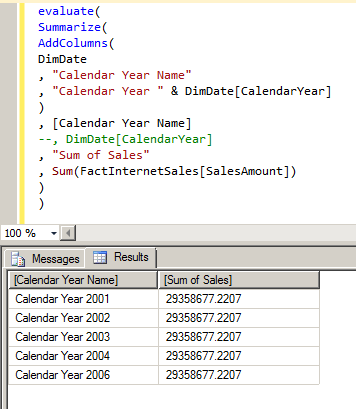
…gives results you may not be expecting: instead of getting the sum for each year, you get the sum for all years repeated; I’m told this scenario may be changed to throw an error at RTM. AddColumns() should only be used for formatting a resultset.
If you uncomment the line grouping by DimDate[CalendarYear], you’ll see you get meaningful results:

 |
Chris has been working with Microsoft BI tools since he started using beta 3 of OLAP Services back in the late 90s. Since then he has worked with Analysis Services in a number of roles (including three years spent with Microsoft Consulting Services) and he is now an independent consultant specialising in complex MDX, Analysis Services cube design and Analysis Services query performance problems. His company website can be found at http://www.crossjoin.co.uk and his blog can be found at http://cwebbbi.wordpress.com/ . |
Tags: dax